
If you’re anything like me, your music collection is a total disaster area.
Over the past decade, I accumulated over 30,000 audio tracks scattered across random folders, external hard drives, and old backups. We’re talking duplicate MP3s, 128kbps low-quality rips from 2012, random voice notes, 10-minute podcast intros, and songs where the artist name is just Track 01.
I really wanted to clean it up. But when I sat down to do it manually, I realized how brutal it was.
The Problem: Cleaning Music standard way is painful
At first, I tried using standard media players (like VLC or Windows Media Player) alongside File Explorer. My workflow looked like this:
- Open folder in File Explorer.
- Double-click a song to play.
- Wait for the player to open.
- Listen to the intro for 15 seconds to figure out what song it is.
- Alt-Tab back to File Explorer.
- Hit
Deleteor drag it to a “Keep” folder. - Repeat.
It took about 15–20 seconds per song. Doing the math: 30,000 songs × 15 seconds = 125 hours of pure manual labor.
I tried a few existing duplicate finders and cleanup tools, but they either felt super clunky, crashed on large folders, or forced me to click through annoying prompt dialogs (“Are you sure you want to delete this file?“) every single time.
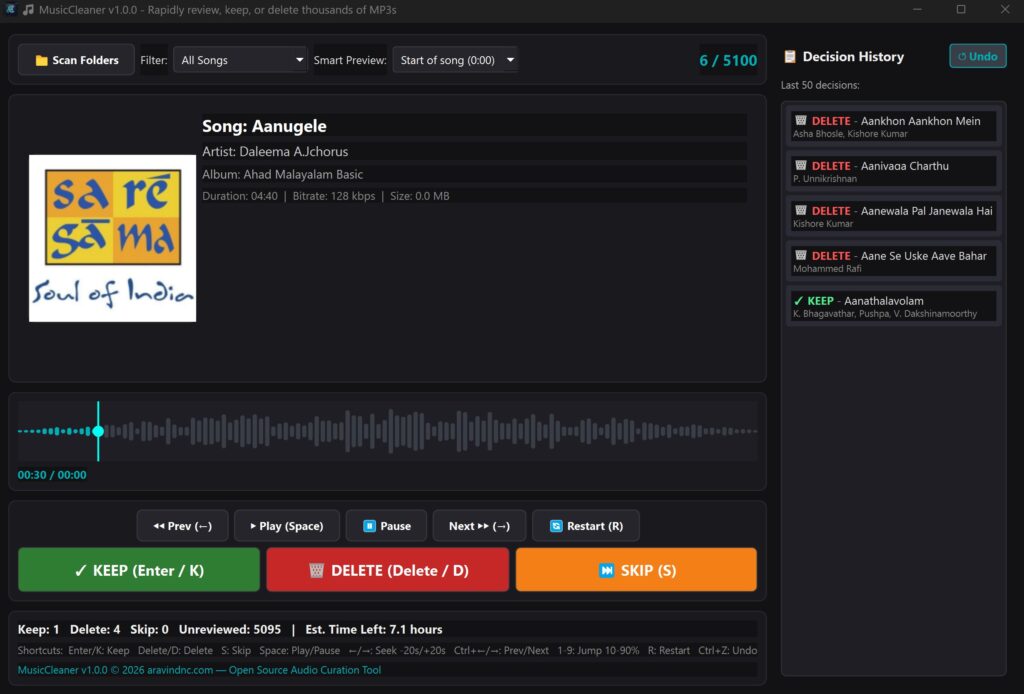
I just wanted a Tinder-like experience for my local MP3s: Keep, Delete, or Skip—with zero lag.
So I decided, “Hey, how hard could it be to build my own desktop app for this?”
The Tech Stack: Keeping it Simple
Since I wanted to build this fast and deploy it locally without wrestling with heavy frameworks, I went with Python:
- PyQt6: For the GUI. It gives a nice desktop native feel and lets me handle keyboard shortcuts easily.
- SQLite: To store song metadata, review statuses (
kept,deleted,skipped), and decision history locally so I can close the app anytime and resume right where I left off. - Pygame / Mutagen: For low-level audio playback and reading ID3 metadata tags (artist, title, bitrate, duration).
The Technical Roadblocks & Solutions
1. The Audio Lag Problem (and pre-buffering)
When you’re trying to review 800+ songs an hour, even a 0.5-second delay between pressing “Next” and hearing audio ruins the flow. At first, my app would lag every time it loaded a new track from disk.
The Solution: I implemented background RAM pre-buffering. While you’re listening to track #10, the app quietly loads track #11 into memory in a background thread. When you hit Keep or Delete, track #11 starts playing literally instantly (0ms delay).
2. “Why do I have to listen to 20 seconds of silence/intros?”
Most songs have quiet intros or slow builds. Sitting through 15 seconds just to reach the chorus was slowing me down.
The Solution: Smart Preview Modes! I added algorithms to auto-jump playback straight to the best part of the song:
- Chorus / Loudest Peak: Automatically scans the audio waveform and jumps to the highest energy section.
- Middle + 30s or Custom Offsets: Skips boring intros entirely.
3. Interactive Waveform & Instant Jumps
Sometimes you just want to scrub through a track fast. I built a custom visual audio timeline/waveform widget. Now I can just click anywhere on the waveform, scroll the mouse wheel to seek, or hit number keys 1 through 9 to instantly jump to 10%–90% of the song length.
4. “Oh no, I accidentally deleted my favorite song!”
When you’re smashing the D key at full speed, misclicks happen.
The Solution:
- Files aren’t permanently wiped—they are safely moved to the OS Recycle Bin.
- I added a live Action History Sidebar with an instant
Ctrl+ZUndo feature and a one-click “Restore” button.
How It Turned Out
After finishing MusicCleaner, my curation speed went from ~150 songs/hour up to 700–1,000 songs per hour. I managed to purge over 80GB of duplicate and garbage audio files in just a couple of evenings while watching YouTube on my second monitor.
Key shortcuts I ended up using non-stop:
KorEnter→ KeepDorDelete→ DeleteS→ Skip1–9→ Jump across track timelineCtrl + Z→ Undo
Try it out / Open Source
I packaged the app into a standalone Windows executable (.exe) so you don’t even need Python installed to run it.
- GitHub Repo: github.com/aravindnc/music-cleaner
- License: MIT (Feel free to fork it, tweak it, or use the code!)
If you have a massive, chaotic music library sitting on your disk, grab the .exe from the GitHub releases and give it a spin. Let me know if it saves your sanity like it saved mine!
🏴☠️ Pirate’s Oath
I refuse to confirm or deny the presence of an unusually intelligent cabin boy aboard this voyage.
Any resemblance to modern technology is purely coincidental. ;)
🏴☠️







Leave A Comment
You must be logged in to post a comment.